
EC: Training an AI
Due: Tuesday, October 6, 2026, 12:00 AM
- Points possible
- 10
 Learning Target
- Use Google Teachable Machine to train an AI that can identify two specific types of images.
 Resources
Google's Teachable Machine:
https://teachablemachine.withgoogle.com
Important Notes:
-
- The teachable machine will not work with WEBP images.
- Be sure your images are of type PNG or JPG (JPEG).
 Instructions
Step 1: Create your AI project
-
- Go to https://teachablemachine.withgoogle.com
- Select Image Project.
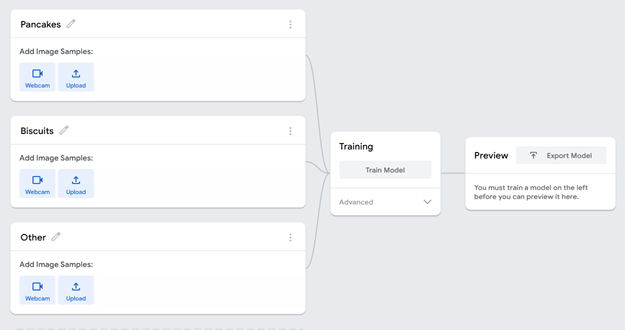
- Create three classes:
- Type 1 — the first type of thing you want the AI to identify.
- Type 2 — the second type of thing you want the AI to identify.
- Catch All — things that are neither Type 1 nor Type 2.
Examples:
-
-
- Pens, Pencils, Neither
- Trees, Bushes, Other
- Dogs, Cats, Other pets
-
Step 2: Add training data
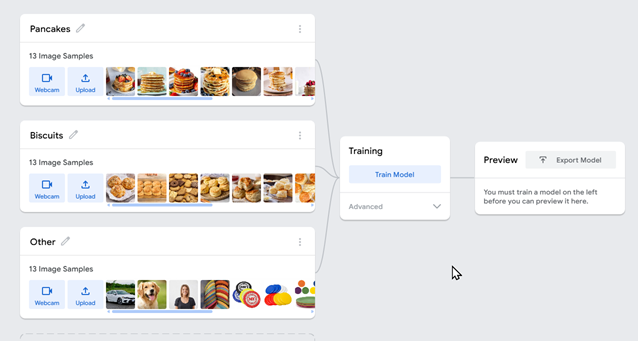
Add at least 5 images to each class.
Note: You will earn more points if your AI is well-trained. This will likely require more images.
Your images should show variety. For example, use different:
-
- Angles
- Backgrounds
- Lighting
- Sizes
- Positions
The Catch All class should contain a variety of things that are not either of your target types.
SAVE NOW!
Save your project frequently to Google Drive so you don't lose any of your work. You will need to turn in this project.
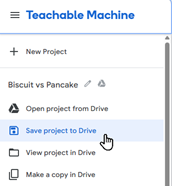
Save your project frequently to Google Drive so you don't lose any of your work. You will need to turn in this project.
Step 3: Train the AI model
-
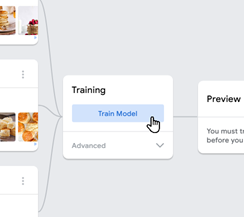
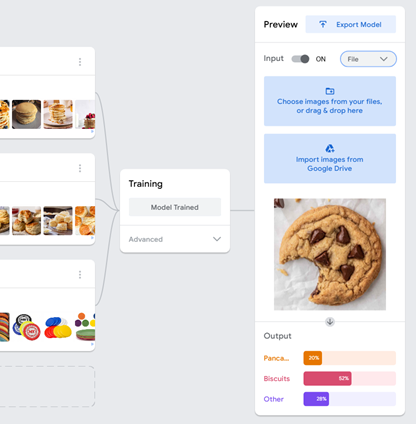
- Click Train Model and wait for the training to finish.
Step 4: Test your AI model
Test the AI using new images that were not used for training.
Test at least:
-
-
3 images of Type 1
-
3 images of Type 2
-
4 Catch All images
-
Record how many of the 10 tests the AI identifies correctly.
Step 5: Improve your AI model
If it is making lots of mistakes, you should try doing one or both of these:
-
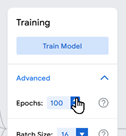
- Increase the number of Epochs used in training (may help):
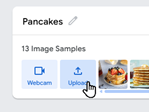
- Add more training images that are notably different from those you already have (most beneficial):
- Increase the number of Epochs used in training (may help):
SAVE NOW!
Save your project frequently to Google Drive so you don't lose any of your work. You will need to turn in this project.
Save your project frequently to Google Drive so you don't lose any of your work. You will need to turn in this project.